Can You Add Your Own Sprites to This AI Game Generator?
No. WordstoGame currently has no sprite upload, asset import or code editor. Naming an image in your prompt does not load it. The AI game generator makes simple 2D single-player browser games with built-in drawing rules. You can choose a visual style, but cannot replace the player with your own PNG through this tool.
Try the browser generatorThe real question: can you bring your own assets?
In an AI game development discussion, a reader wanted to know whether a creator could intervene in the build rather than accept everything the engine produced:
“Can you inject your own asset, code halfway?”
That question concerned another engine. Our answer here covers WordstoGame's own interface and output. A playable result alone does not establish that a tool can accept a character image or an existing project.
Our exact custom-sprite request
We opened the live homepage in a fresh desktop Chrome browser session and entered this sentence:
a forest collector using my own fox.png sprite, gathering glow seeds and avoiding shadow beasts
We deliberately included a filename to test whether merely requesting personal art changed the result. We did not upload an actual fox image: the interface offered no upload control. This checks the prompt and available import path, rather than compatibility with a particular PNG.
- Open the homepage tool and paste the sentence into Describe your game.
- Choose Collector under Game type and Retro pixel under Visual style.
- Choose Easy. Leave Power-ups, Countdown timer and More enemies off.
- Press Generate game. Read the goal and the source badge beneath the canvas.
- Inspect the player on the canvas. After recording the result, we pressed Restart, focused the canvas and held the right arrow for about 0.35 seconds.
What appeared instead of a custom fox
- Generated title
- Forest Collector Using
- Settings and source
- Collector · Retro · Easy · LOCAL ENGINE
- Actual goal
- Clear 5 waves: collect 12 glow seeds in total.
- Opening state
- Wave 1/5, progress 0/2, score 0 and 5 starting health.
- Player appearance
- A green circular player with a surrounding ring. No fox illustration or imported sprite appeared.
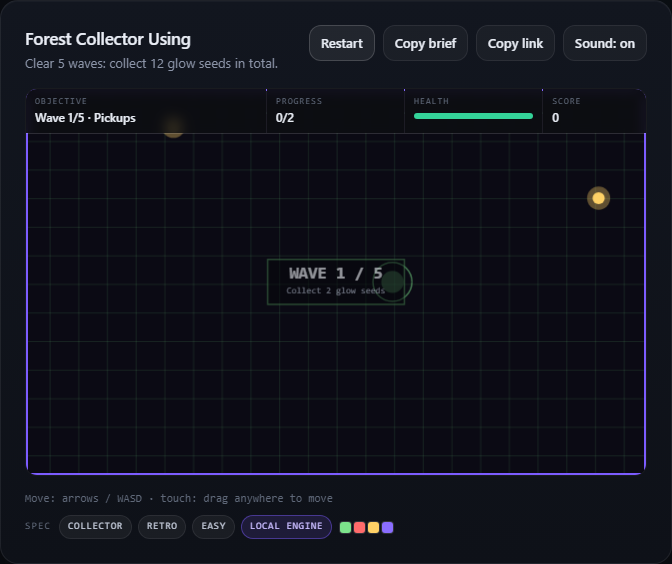
The initial status said the model was refining the game. After waiting about 32 seconds, the status reported that the model was unavailable and the game was built locally. The title and goal stayed the same. This run therefore demonstrates the local fallback; it does not show a successful model-generated redesign.
We also checked movement rather than treating the title as proof of a working game. The read-only game snapshot placed the player at x=311 before the arrow input and approximately x=367.6 afterward, with its y position unchanged. We did not finish all five waves in this test.
The form contained one text area and two select menus, alongside the difficulty and extra buttons. There was no file input. The recorded browser requests did not include a request for fox.png. Writing that filename described an idea; it supplied no image bytes or usable asset location.
What you can change here today
For a quick arcade prototype, use the Game type and Visual style controls to choose among supported rules and appearances, then generate again. Retro pixel is a style setting, not an import slot for a sprite sheet. The sentence can describe a setting or action without creating a custom asset pipeline.
If your project requires a specific character illustration, animation frames or your own code, this interface cannot insert them. It also does not create 3D games, multiplayer sessions or downloadable game files. Keep that requirement separate from testing a small browser prototype.
Open WordstoGame to try the exact input. For a broader visual-style example, read our tested style guide; for how prompts and runtime connect, read the first-prompt walkthrough.