Can You Reduce Screen Shake in This AI Game Generator?
Yes: the current engine honors your browser's reduced-motion preference at page load, suppressing screen-shake translation. There is no separate screen-shake switch in the tool. Enable reduced motion in your system or browser, reload the page, and then generate a game. This reduces some effects; it does not disable every animation or flash. The AI game generator makes simple 2D single-player browser games.
The real user problem
In a discussion of Steel Maiden, a game whose creator describes an AI-assisted production process, GraphXGames wrote:
“This screen shaking and freezing are very annoying.”
The developer replied that screen effects could be turned off in that game's settings. We opened and read the original discussion on October 18, 2026. That is feedback about another game, not a report about WordstoGame. It raises a concrete question for our generator: how can a player reduce screen shake here?
Repeat the actual generation
a space shooter with reduced screen shake and gentle visual effects
- Open the homepage tool and enter this sentence.
- Choose Shooter, Retro pixel and Easy. Leave Extras off.
- Generate the game. In each test we waited 33 seconds for the optional model response.
- Click Restart to start a fresh observation. The shooter fires automatically; we left the player stationary for about 4.5 seconds.
- Repeat with reduced motion enabled before loading the page. Compare the rendering behavior rather than trusting a generated title or tagline.
Two live browser runs
We ran the public homepage in Chrome twice, with browser media emulation set first to no preference and then to reduce. Both runs used the same prompt and visible settings. They were separate generations, so this is a check of the preference path rather than a controlled comparison of identical random enemies or model output.
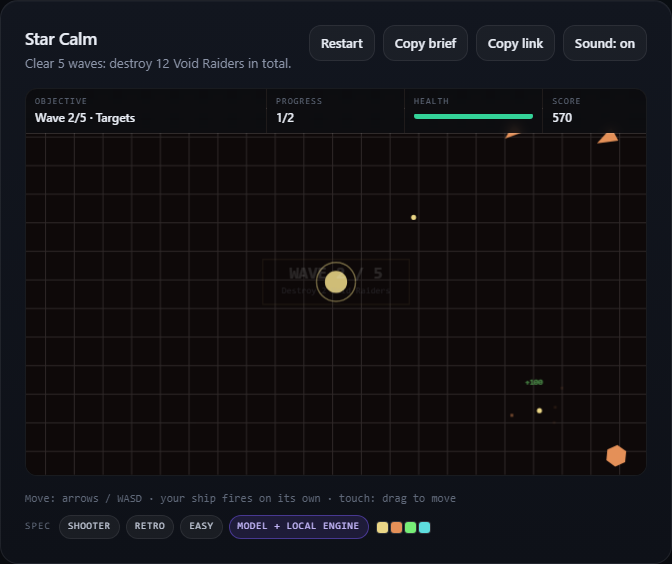
The normal-preference run produced Star Calm. Its recorded snapshot showed 2 kills, 460 points and 5 health. The reduced-motion run produced Star Calm, with 3 kills, 570 points and 5 health. These are short observed intervals, not completed playthroughs.
We instrumented the canvas translation method with a wrapper that called the original method unchanged and recorded its arguments. We did not set health, spawn enemies, force hits or change game state. In the normal interval we recorded 10 translation calls; in the reduced-motion interval we recorded 0. The browser media query returned false and true, respectively. This is rendering evidence, not a claim about how comfortable either run feels to a particular player.
What the current source confirms
We inspected the deployed engine logic alongside the live runs. It reads prefers-reduced-motion once when the script starts. The drawing routine uses zero shake when that preference is enabled, so the random canvas offset is skipped. Particle bursts above four particles are also capped at four. Scrolling to the game uses an immediate jump instead of smooth scrolling.
The preference is captured at startup. Reload after changing it; this implementation does not register a listener that updates the captured value during a session. The prompt alone is not the switch: our normal run requested gentle effects too, yet still used translations. The browser preference is the setting we actually tested.
Reduced motion is not an all-effects-off mode. The source still draws the damage vignette, and gameplay, projectiles and counters continue. We did not test every device, operating-system settings path or photosensitivity requirement. We cannot infer medical safety from suppressed camera motion or a screenshot.
Use the tested scope
Use your device's reduced-motion preference and reload before playing if you want the engine's quieter rendering path. There is no custom effects editor on this page. Do not assume another game's settings menu exists here. WordstoGame currently offers simple browser games, without 3D, multiplayer, game-file export or batch generation.