October 10, 2026 · How to make a game · Complete browser run
How to make a game here, from one sentence to a win screen
Four steps: choose a finishable objective, type a playable idea, generate, then play the displayed goal. After we entered a comet-shooter sentence and selected Shooter and Easy, the tool produced “Tiny Comet Defender” with a goal of destroying 12 hazards across five waves. We played with the normal canvas control until the screen said “You win”. This is a walkthrough of this tool's small browser game, not a general game-development course.
Step one: choose an objective you can check
On the game maker, the idea field sits beside Game type and Difficulty. We chose a goal that would be visible on the game screen: a ship destroys approaching meteors. That gave us a concrete check after generation—does the result show a Shooter objective and a target counter? The separate first-play test records the blank form and its button state.
Step two: write an action and make the choices visible
We typed “a tiny comet defender where my ship shoots approaching meteors”. The idea counter showed 62. We chose Shooter for Game type and Easy for Difficulty. Those two selections matter: they remove ambiguity about the action and challenge. We left the other settings alone.
That is the complete input for this test. If you leave Game type on Auto, the page may interpret a different idea differently. Our no-code overview covers how to phrase and revise an idea; this walkthrough records what appeared on screen after this specific input.
Step three: press Generate and read the first playable screen
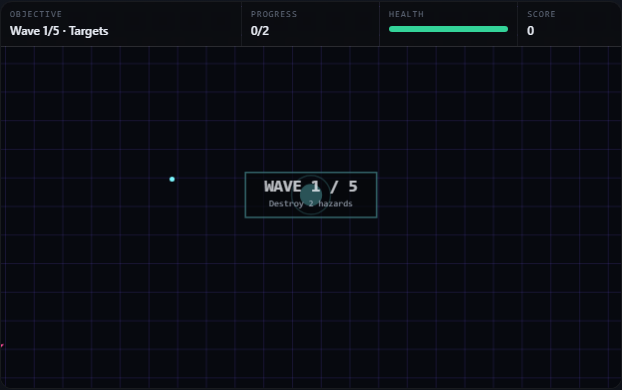
After we pressed Generate game, the title became “Tiny Comet Defender” and the objective read “Clear 5 waves: destroy 12 hazards in total.” The opening display showed Wave 1/5, progress 0/2, score 0 and 5 health. Its control line said “Move: arrows / WASD · your ship fires on its own · touch: drag to move.” The game was already running on the same page; there was no separate Play or export step.
The first playable screen in this run, immediately after Generate. The HUD shows the current wave, its short target, health and score.
For repeatability we blocked the optional model request in this automated test. The status line explicitly reported a local Shooter build. A live model response can refine wording later; the model test records that separate behavior.
Step four: move, watch progress, and finish the objective
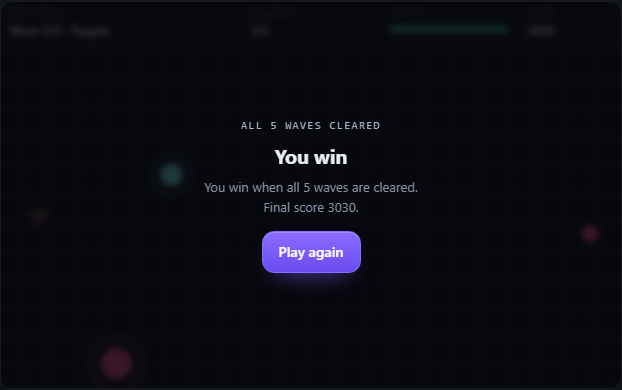
We held the normal canvas pointer control and moved the ship while it fired automatically. We did not edit health, score, enemies or wave progress. At the starts of the following waves, the cumulative kill counts were 2, 4, 6 and 9. Reaching 12 kills on the fifth wave ended this run on its win screen. Health was still 5/5, and the final score was 3030. The overlay said “You win when all 5 waves are cleared. Final score 3030.”
The end of the same browser run. “Play again” appeared beneath the win result.
An earlier, separate run with the same comet prompt also cleared five waves and 12 hazards, but finished with 3280 points. The two scores are observations from different plays, not a fixed score promised by the tool. This page's screenshots and 3030 result belong to the newer run.
What you have made
You have a playable, single-player arcade game on this browser page. This walkthrough shows the complete route from an empty form to one win. It does not produce a downloadable app or editable game project. If your next question is what a copied link saves or whether a run survives refresh, see the link test and reload test; neither is needed to play the game you just generated.