October 10, 2026 · Best AI game maker · Tool comparison
Best AI game maker: which one fits what you want to make?
For a small playable arcade game without creating an account, try our browser tool. For a project you can keep editing and eventually export as code, examine Rosebud or Tesana and their paid-plan terms. For publishing into a game feed and building an audience there, examine Astrocade. There is no single best choice for all four jobs. Our tool does not export a game file or produce a long-form 3D world.
Choose by the result you need
On a narrow screen, swipe the table sideways to see each tool's limits.
A game project you can revise with an AI editor, plus generated assets. Its product pages describe 2D and 3D game making.
Rosebud's current plan page puts downloadable project code and Windows export on Pro and higher plans. Check the credit cost and the plan that grants the rights you need.
Making a game for other people to discover on the same platform. Its creator page describes a game feed, audience tools, lessons and play-based earnings.
These are Astrocade's published product claims. We did not create or publish a game there, and its creator page does not establish that you can download a standalone project.
Typing a short idea and playing a small 2D shooter, collector or survival game in the browser without sign-up.
One idea makes one arcade game. You can copy a settings link or text brief, but there is no source-code download, standalone export or saved play session.
These rows compare documented capabilities and a test of our own site, not a controlled quality contest. We have not run the same prompt through the three other tools, so we cannot claim which one produces the best game from that prompt.
What our own tool actually made today
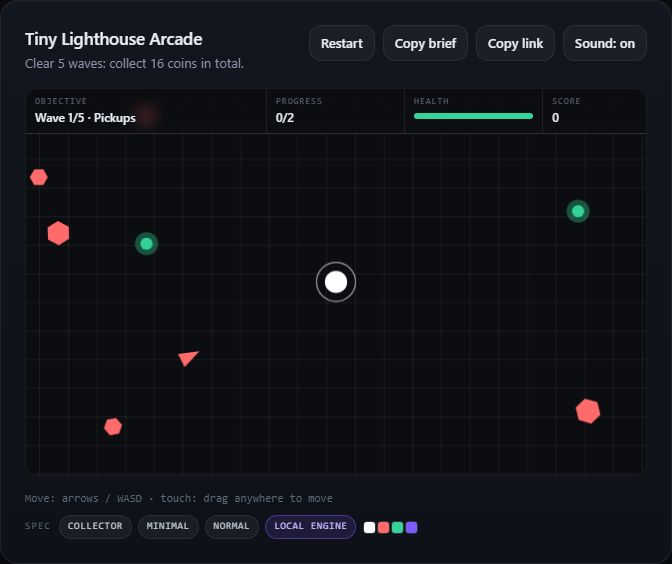
In a fresh browser session on the live site, we entered “a tiny lighthouse arcade game where you collect signal flares and avoid moving fog”. We chose Collector and Minimal, then pressed Generate game. The page opened a playable canvas titled Tiny Lighthouse Arcade. Its opening display showed wave 1/5, progress 0/2, score 0 and 4/4 health. Restart, Copy brief and Copy link were available.
The live-site test after generation. The local result is playable, but the requested “signal flares” became “coins.”
The goal read “Clear 5 waves: collect 16 coins in total.” That noun change matters when choosing a tool: this one can quickly supply arcade rules and controls, but a sentence does not give precise control over every object. At the point recorded, the status still said it was refining with the optional model. This screenshot and these values document the local result only; they do not establish what a later model response would change. We did not finish this run or test the other services with this prompt.
Three checks before you commit to a maker
Play it: confirm that the result responds to your controls and has the mechanic you requested, rather than judging only by a title or preview image. Keep it: check whether a shared URL saves the exact session, rebuilds from settings, or gives you code and files. On this site, our link test found that it rebuilds from settings. Budget it: if you need export or repeated AI edits, inspect the provider's current credits and rights before you begin. “Free to start” does not mean unlimited production or export.
If you only need a quick arcade prototype to play now, start here. If you need a reusable game project, choose a tool with the required export path first. If you need an on-platform audience, investigate how the platform publishes and distributes games. Those different end results are the reason this comparison gives use cases rather than a universal winner.